Why Your Business Emails Are Going to Spam and Other Cybersecurity Issues: A Google Workspace Security Audit Reveals the Real Cause
Branding
Web Design
Web Development
SEO
The Interview
Recently, our Tegrity Marketing team has been fielding questions from our clients like “Why are my emails going to spam?” and “Why are we having Email deliverability issues?”
These are great questions, but they are a bit outside of our Tegrity Marketing vibes and lane. While we do handle email marketing for small business, what we don’t have is the answers regarding email deliverability issues.
So, we reached out to friends at Adelia Risk to see if we could help our clients find answers. What we were told was that many email deliverability issues were actually caused by cybersecurity issues inside the Google Workspace environment.
Adelia Risk is the team we use to help us with cybersecurity issues at Tegrity Marketing. Since 2017, they have been helping businesses of all sizes keep their information and data safe.
To help our clients stay safe, we sat down with Josh Ablett, the Founder of Adelia Risk, for an interview. The transcript is below:
A lot of small businesses assume Google Workspace is safe and secure without having to do anything. What are they getting wrong?
Google Workspace is secure out of the box in the same way a new car is safe out of the lot - the airbags work, but you still have to put on a seatbelt. The defaults settings are fine for personal use, but the defaults Google chose are not sufficient for most businesses.
We run dozens of annual Google Workspace security audits. The average first-year audit comes back with about 18 outright failures, and the worst we’ve ever seen was 37 fails out of 59 settings reviewed. These aren’t bad companies or careless owners (and many of them even have an IT firm in the mix). They’re businesses that opened a Google Workspace account, started getting work done, and never went back to look at the admin settings.
The thing that surprises owners most is that they assume Google has them covered. But Google, like all other large firms, have what’s called a “shared responsibility model.” There are things that are their responsibility, but there are also tons of things that are the client’s responsibility.

What are the most common Google Workspace security mistakes you see?
If I rank by how often it shows up in our 78-audit corpus, the top five are:
MFA enforcement — failed at every single one of the clients we’ve audited.
2-step verification gaps (super-admins exempted, recovery options weak) — failed on 97% of audits.
Phishing protection settings — failed on 95% of audits.
Email authentication (DMARC, SPF, DKIM not properly configured) — failed on 95% of audits.
Third-party app and OAuth controls wide open — failed on 90% of audits.
The pattern that ties them together is most owners think “I turned on MFA, we’re good.” What matters in a breach, though, is whether you’re using the RIGHT kind of MFA, whether you have tighter controls on god-like superadmin, and whether some careless user can add a third-party tool that ignores your MFA entirely.
What do these have to do with my emails going to Spam?
#4 on the list above is the hidden killer. If you don’t carefully manage these three settings, all of the major email providers (Gmail, Microsoft, Yahoo, and more) are much more likely to send your marketing and update emails to the Spam folder.
A lot of business owners don’t realize how important these settings are, and they don’t find out that many of their marketing emails are never even being seen by their clients or prospects.
If a company is using Gmail, Google Drive, Google Meet, and Docs every day, where are they most exposed?
Gmail and Drive, by a wide margin.
Gmail is where the money lives. A single compromised mailbox gives an attacker your conversations with clients, your wire instructions, and a perfect platform to impersonate you. The exposure I see most is that auto-forwarding is turned on (we found this as a hard fail at 33% of audits), weak phishing filters, and DMARC stuck in monitor-only mode so spoofed mail still lands.
Drive is where the data is. The default external sharing setting in most tenants is far more permissive than the owner thinks, and we routinely find files shared with “anyone with the link” that haven’t been touched in three years.
The hidden exposure under both is third-party OAuth apps. Someone installs an “AI assistant for Gmail” or a calendar plug-in, clicks approve on the consent screen, and that vendor now has read access to the mailbox or Drive. It survives password resets and MFA.

What kinds of business data are most at risk when Google Workspace is not configured properly?
In order of what we actually see:
Client communication. Email threads with proposals, contracts, wire instructions, signed engagement letters. Email is the easiest thing for an attacker to monetize because it lets them impersonate you to your customers.
Files in Drive. Tax returns, financial statements, employee records, board minutes. Most small businesses have one or two folders they would not want screenshotted on the internet, and most of them don’t know exactly which folders those are.
Credentials and secrets in old emails. Password reset links, vendor API keys someone emailed themselves “just to have a copy.” A compromised inbox is also a key chain.
Calendar and contact data. Less obvious, but we’ve seen attackers use calendar access to learn org charts and time meetings for their own social engineering. There’s actually been a big spike lately in spammy calendar invites!
For regulated businesses — RIAs, healthcare practices, financial services, anything handling payment data — the exposure is a reportable event.

Are there any Google Workspace security gaps that are especially common with smaller companies that do not have a dedicated IT or security person?
Many of our audits include small companies without dedicated IT. So when I quote a 100% MFA failure rate or 90% OAuth failure rate, that also applies to the small-firm-without-IT profile.
The specific gaps that almost always show up at understaffed firms:
Super-admin accounts on the owner’s primary login. No separate break-glass admin, no 2-step verification, sometimes shared with a bookkeeper. We found a fintech where SSO was beautifully set up for end users but the super-admin — which by Google’s design bypasses SSO — had nothing but a password protecting it.
Auto-forwarding to personal Gmail. Someone wanted to read a work email on their phone five years ago. Nobody turned it off.
Marketplace wide open. The owner’s son installed a plug-in in 2021. The grant is still there.
No documented offboarding. When a contractor leaves, their account gets suspended but their OAuth grants and forwarding rules survive.
None of these need a security team to fix. They need fifteen minutes and someone who knows where to look.
What is one mistake you see that makes you immediately think, “This company is a major target for hackers”?
A super-admin account with no 2-step verification on it.
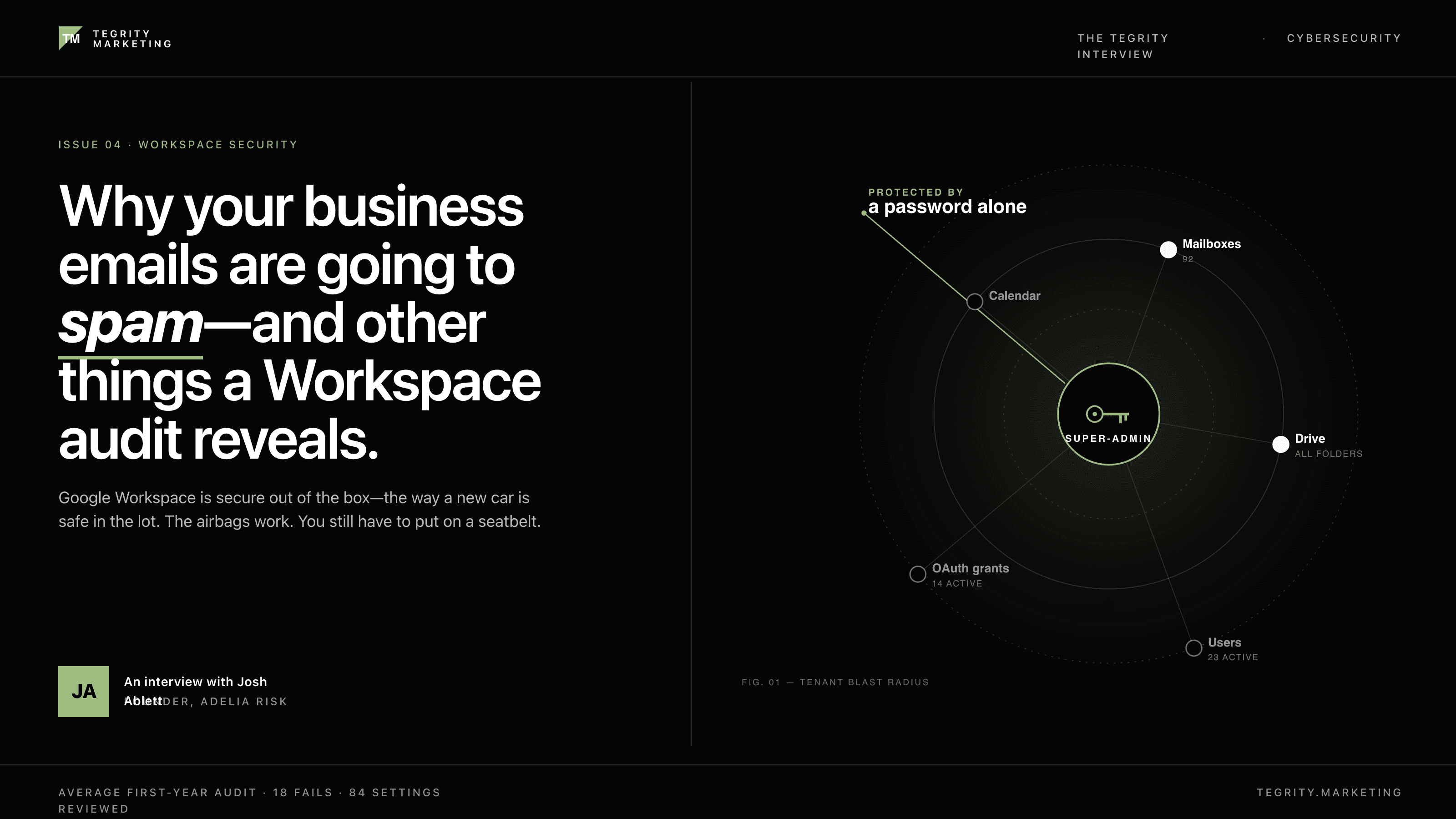
The super-admin account is the master key to the whole tenant — every mailbox, every Drive folder, every setting. In Google Workspace, super-admins are intentionally exempt from SSO so you can recover the tenant if your identity provider goes down. That same exemption means if someone phishes the super-admin password, they own everything, and SSO doesn’t save you.
We’ve found this exact configuration on first-year audits: SSO perfectly configured for staff, super-admin protected by a password alone. That’s the moment I know the firm has been lucky, not careful.
The fix is ten minutes: enforce 2-step verification on the super-admin OU specifically, ideally with a hardware key, set up a documented break-glass account, and store the recovery codes somewhere that isn’t the same Google account they protect.
For companies that are busy or understaffed, what are the first 3 things they should check in Google Workspace this week?
Enforce 2-step verification on every account, especially the super-admin. Admin console → Security → Authentication → 2-Step Verification → Enforcement: On. Then go to Users, sort by admin role, and confirm every super-admin has it enabled. If anyone can log in with just a password today, that’s the first hole to plug.
Turn off email auto-forwarding tenant-wide. Apps → Google Workspace → Gmail → End User Access → uncheck “Allow users to automatically forward incoming email to another address.” Attackers love this setting because it survives a password reset. We’ve found it on as a hard fail at one third of businesses.
Lock down the Marketplace and OAuth scopes. Apps → Google Workspace Marketplace apps → Settings → switch to “Allow users to install only allowlisted Marketplace apps” or “Do not allow users to install any application.” Then review the active third-party app grants under Security → API controls.

How much damage can one bad setting or one bad user decision really do inside Google Workspace?
A lot more than people think, because a Google Workspace tenant is a connected system.
One example from our work: a client had number-matching MFA — the kind where you type a code from your phone — and got breached anyway. Attackers are now actively defeating that flow by relaying the prompt. One employee approved a prompt they shouldn’t have, and the attacker had a session.
Another example, lower-drama but more common: someone clicks “approve” on an OAuth consent screen for an “AI Gmail assistant” they tried for a week and forgot about. That grant gives the vendor read access to the mailbox. The user changes their password, turns on MFA, leaves the company — the grant survives all of it. Until someone explicitly revokes it, that vendor can read mail forever.
So one setting (Marketplace wide open) plus one user decision (clicking approve) bypasses every other control you bought. The setting is free to fix. Most companies haven’t.
What does a quality Google Workspace security audit actually do?
A real audit does three things a vendor checklist doesn’t.
It actually checks the settings. Most “security questionnaires” are self-attestation — does your firm enforce MFA? — and the answer is always yes. We log into the admin console and read the actual configuration. The gap between what owners believe and what’s configured is where most of our 18-fail-per-audit average comes from.
It weighs findings by what would actually hurt you. A wide-open Marketplace is more dangerous to most small firms than an unconfigured DLP policy. A real audit tells you which three findings to fix this month and which fifteen can wait.
It produces evidence you can hand to insurance, regulators, and clients. When a cyber insurance carrier asks “do you enforce MFA tenant-wide?” or a prospect’s TPRM team sends a 200-question security questionnaire, having a recent audit report changes that conversation from “we think so” to “here’s the documented finding from our annual review.”
Be careful, though – that evidence is a double-edged sword. If you run an audit but then don’t do the work to fix it, you’re documenting a pattern of neglect that could bite you in a breach or lawsuit.
When you run a security audit, what are some of the “hidden” issues you tend to find that business owners did not know were there?
Top five, in order of how often they surprise the owner:
Active OAuth grants from apps the company stopped using. Examples include, a Gmail summary tool from 2020 or a meeting-notes app a former employee tried for a week. The grants are still there, still able to read mail.
Super-admin accounts other than the one the owner thinks about. Often the IT person who set the tenant up years ago, sometimes a vendor.
Externally-shared Drive files from former employees. Files shared with “anyone with the link” that haven’t been touched in years. Most owners don’t know there’s a way to find these.
Email forwarding rules to personal accounts. Set up by the user, not visible to the owner unless they specifically look.
Marketing emails from the business landing in Spam because of SPF and DKIM DMARC reports look like they’re working but the records have a typo. I’ve had this happen on my own domain — it’s easy to get wrong and easy to miss.
None of these would show up in a vulnerability scan or an MDR product. You have to know to look.

You built a 97-point Google Workspace security checklist. This is something that we’ve been using at Tegrity Marketing to secure our systems, and we’ve also been telling our clients about it. What kinds of things are on that checklist that most companies never even think about?
The current version of our checklist covers 84 settings across 7 areas — Authentication, Email Security, Drive and Docs, Chat and Meet, Administrative Controls, Apps Services and API, and Devices and Mobile.
The settings most companies have never heard of:
OAuth scope blocking and the high-risk app review workflow. Lets you allow Google Calendar sync but block “read all email” without managing each app one by one.
Context-Aware Access on third-party OAuth apps. Most tenants apply device trust to first-party Google services and forget the third-party connections that are equally privileged.
The super-admin SSO bypass. Super-admins are exempt from single sign-on (SSO) by design — almost no one knows this, and it’s how we keep finding super-admins protected by a password alone.
Drive SDK and Add-Ons settings, separate from Marketplace. Three different toggles, each governing a different way third-party software gets access. Closing one doesn’t close the others.
The Trust setting that decides which external domains can share into your Drive. Default behavior is more permissive than most owners would choose if they read it carefully.
Recovery options on the super-admin. Personal phone number on the master account is the single most common phishing target.
If a business owner only has time to focus on one area first, where should they start?
Authentication. Specifically, MFA enforcement on the super-admin and on every user account.
The reason is because if an attacker can log in as one of your people, every other control you’ve bought becomes negotiable. They’re inside the perimeter, using a real account, generating real audit logs that look like normal activity. DLP doesn’t stop them. Endpoint protection doesn’t see them. The other 80 settings on the checklist matter less if this one is broken.
Phishing-resistant MFA — passkeys or hardware keys — is the right target state. Number-matching MFA is no longer enough because the Adelia Risk team has watched a client get breached through it. But even basic 2-step verification enforced for everyone is dramatically better than what most small firms have today, which is “MFA is on for the people who turned it on.”
But, at the very least, use Google Prompt for now. If you’re still using SMS or Google Authenticator six-digit codes, prepare to be hacked.
How much of Google Workspace security comes down to settings, and how much comes down to user behavior?
Settings get you most of the way there. Maybe 70-30, settings to behavior.
The reason is because a well-configured tenant makes the dangerous user behaviors impossible or visible. If the Marketplace is locked down, a user can’t approve a sketchy OAuth grant in the first place. If forwarding is disabled at the admin level, an employee can’t quietly redirect work mail to personal Gmail. If phishing-resistant MFA is enforced, even an employee who falls for a phishing page can’t actually hand over a working session.
Behavior still matters. Wire-fraud social engineering doesn’t care about your tenant settings. That’s where awareness training is so important for small or local businesses. Same for password reuse, careless Drive sharing, and clicking through warning prompts.
But for the core 80% of risk in a Google Workspace tenant is in the admin settings.
Where do you see marketing agencies, home service businesses, and other small and local businesses leave themselves open the most?
The pattern is the same across industries because the technology is the same. The differences are mostly in what gets stolen.
By not paying attention to these settings, you’re leaving anything that might happen in your email exposed. Invoices, bank account numbers, credit card numbers, client names and email addresses. Worse, if someone gets into your email, they will use your account to send spam to all of your clients and contacts.
What is your take on third-party apps and integrations inside Google Workspace? Is that leaving small businesses more open to cybersecurity risks?
Yes, and it’s the most underrated risk in the platform.
Third-party app and OAuth controls fail at almost every client.
A third-party OAuth grant survives MFA, phishing-resistant authentication, conditional access, and password rotation. Once a user clicks “approve” on a consent screen — read all your mail, read all your Drive — that vendor has the access until someone explicitly revokes it. Most companies have never reviewed the active grants in their tenant.
The good news is the fix is easy.
How often should a business review its Google Workspace settings?
Once a year. And drift-monitor in between.
The annual audit is the version we run for clients — full review of every relevant control, the kind of pass that turns up the 18 fails on average in our corpus. That’s the cadence the SEC, HIPAA, and most cyber insurance carriers expect, and it matches how often Google ships meaningful changes to the admin console.
In between, the things to spot-check quarterly are the ones that drift fastest:
Super-admin list. Make sure no one new has shown up.
Active OAuth grants. Apps come and go but the grants don’t go on their own.
External Drive shares. Files routinely get shared during a project and never unshared.
Forwarding rules. Users add these ad-hoc.
Google has a nice alerting feature that can trigger an email to you when something weird happens. We tell clients how to set these up in our audits.
What kinds of businesses should stop trying to “DIY” cybersecurity and bring in outside help?
Four signals that say it’s time:
You’re regulated (or your customers are). RIAs under SEC oversight, healthcare practices touching PHI, anyone handling cardholder data, and increasingly anyone selling into mid-market businesses that send 200-question security questionnaires. The compliance cost of getting it wrong is higher than the cost of getting help, and your insurance carrier expects evidence you can’t produce alone.
You’ve grown past 10-20 employees. Below that, the owner can usually keep their arms around the tenant if they care to. Above it, the offboarding events, contractor onboardings, and OAuth grants pile up faster than one person can track them, and stuff starts slipping.
Your last audit found things that surprised you. If you ran a checklist or got an MSP review and there were findings that made you say “wait, we have what turned on?” — that’s the signal. The first audit finds the obvious things. The second one tests whether you have a process to keep them fixed. Most owners don’t, and there’s no shame in admitting that’s not where they want to spend their time.
You just don’t have time to stay on top of this. Business owners have a lot on their plates. Maybe they find this topic fun, or maybe they want to stay focused on sales and marketing and operations.
The DIY threshold isn’t really about size or industry. It’s about whether security is supposed to be a hobby for the owner or a function of the business. Past a certain point, treating it as the former is the more expensive choice.
Now Is the Time to Review Your Google Workplace Security Settings
This article might have made you feel uncomfortable, especially now that you know that the reason your marketing emails are landing in spam might have nothing to do with your subject lines, send times, or list hygiene. It might be a handful of settings inside Google Workspace that nobody told you to check.
That’s the part that surprised us most. As a marketing agency, we spend a lot of time helping clients improve their email deliverability. However, the deepest fixes are often on the security side, not the marketing side.
Here’s what we’d suggest based on Josh’s interview:
If you have fifteen minutes this week, do the three quick checks Josh recommended — enforce 2-step verification (especially on your super-admin), turn off email auto-forwarding tenant-wide, and lock down the Marketplace.
If you want the full picture, Adelia Risk’s Google Workspace checklist covers all 84 settings across the seven areas Josh mentioned. It’s the same checklist we use internally at Tegrity Marketing to keep our own systems tight, and we trust it enough to send our clients to it.
Adelia Risk handles this work for businesses every day, and they’re who we’d point you to.

